October 10, 2026 · 4 min read
transcribe: from one voice note to an open-source terminal tool
I needed to turn a voice note into text without uploading it anywhere. That same night the ten-line script became an interactive CLI with subtitles, tests and an MIT license.
In this post
It started with a WhatsApp voice note I had to turn into text, fast. Whisper in the cloud solved it in seconds, but one question stuck: why should a personal recording leave my computer for something my own laptop can do?
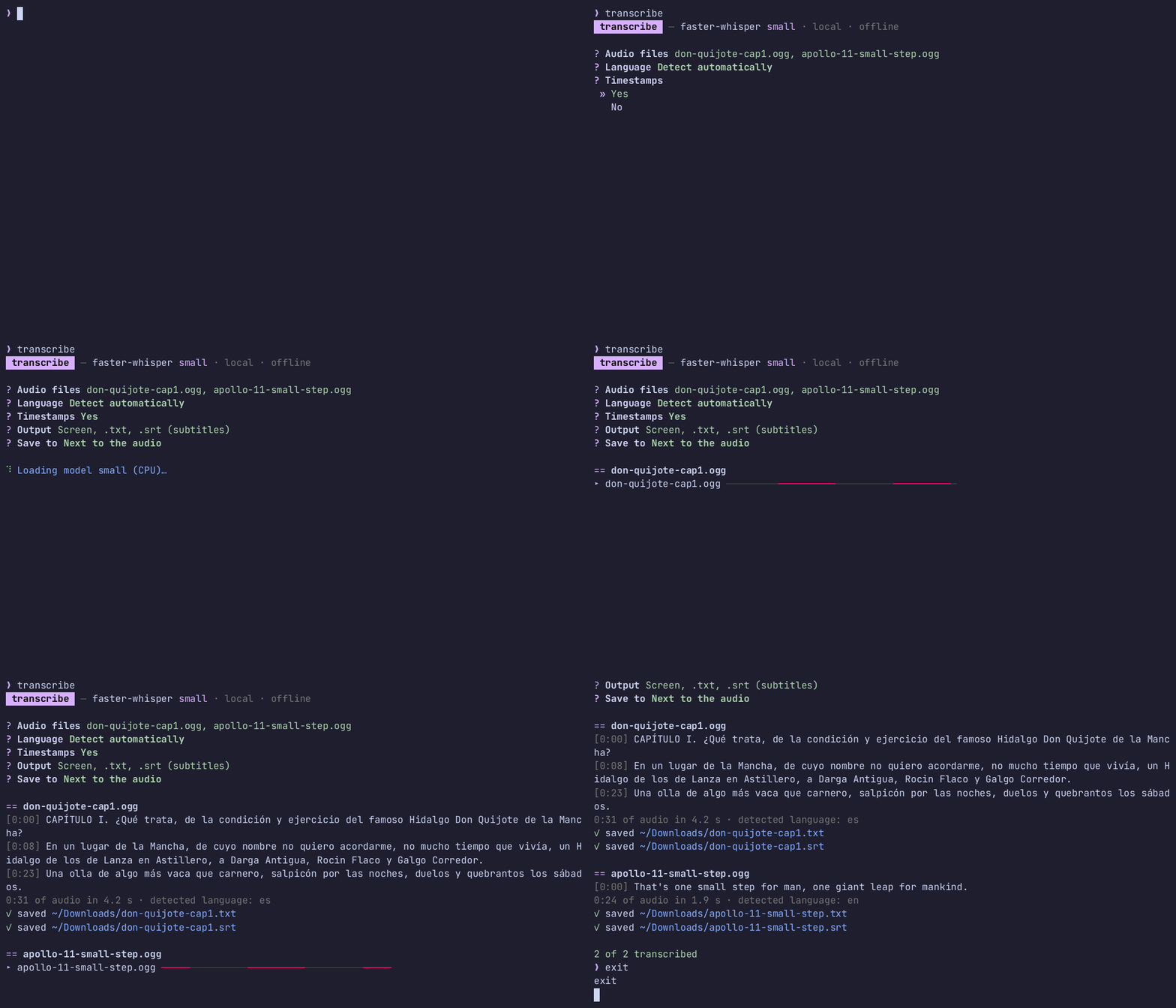
That same night I built transcribe: pick audio or video files from a terminal menu and get the text, with timestamps or subtitles if you want them. All local, no accounts, no API keys.
The first script and the first error
The first version was ten lines using faster-whisper, an optimized Whisper that runs well on a CPU. I installed it, ran it and… error:
TypeError: open() got an unexpected keyword argument 'metadata_errors'faster-whisper reads audio through PyAV, and the PyAV version pip installed didn’t match the one faster-whisper expects. Instead of fighting versions, I took that job away from it: the system’s ffmpeg now decodes the audio to 16 kHz mono and hands the model an array of numbers. As a bonus it reads any format, including the audio track of a video.
Do I need a bigger model?
With the small model on my laptop’s CPU, a 30-second voice note takes about 3 seconds: roughly 10× faster than real time. The transcript was right except for one affectionate word said very fast at the start.
The temptation was to download a bigger model. I compared first, and the large model (large-v3, the same one I had used in the cloud) got that word wrong too. I also tried giving it context with expected words: it fixed two others but swallowed the opening greeting. Conclusion: for voice notes small is enough, and a 3 GB download wasn’t going to fix that case.
A GPU you can see but can’t use
My laptop has an RTX 5070 Laptop GPU. CTranslate2 (faster-whisper’s engine) detected it, so I tried it. The model loaded fine… and only failed when transcribing:
RuntimeError: Library libcublas.so.12 is not found or cannot be loadedThe CUDA libraries were missing. With the GPU as the automatic choice, anyone with an NVIDIA card and no CUDA would get an error — or, at best, a warning on every run. The fix has two parts:
- Before choosing the GPU, check that the CUDA library can actually be loaded. If not, go straight to the CPU, silently.
- If it still fails mid-way, catch the error once, reload the model on the CPU and carry on.
From script to tool
Once it worked, I wanted to use it without typing long paths. Running transcribe with no arguments opens a menu:
- Your Downloads, newest first, with each file’s duration and age. Type to filter, space to select several.
- Search the whole machine: your home folder and mounted drives, using fd and skipping hidden folders, caches and
node_modules. - Then: language (Spanish, English or auto-detect), timestamps, output (screen,
.txt,.srt) and where to save.
All of that also exists as flags (-o, -t, --srt, -l…) for scripts. While it works, the transcript appears line by line with a progress bar, and the interface follows the system language (Spanish or English).
Testing it like a real user found things the tests didn’t. I drove it from tmux, sending keys and capturing the screen, and hit a bug: the menu library’s (questionary) type-to-filter only works with plain-text titles, and I was passing styled text. It also printed “done (2 selections)” in English even with the Spanish interface, so the app now writes that summary itself.
Opening it up
Publishing it forced me to tidy up:
- 29 tests that download nothing: they use a fake model, and the GPU-to-CPU test simulates exactly the
libcublaserror. - GitHub Actions CI on three Python versions.
- No personal audio in the repository:
.gitignoreblocks recordings outside the demo folder, and the demo uses public-domain audio (Apollo 11’s “One small step” and the opening of Don Quixote from LibriVox). - README in English and Spanish, architecture notes and the GIF above, recorded with asciinema.
It’s at github.com/rossmelabasto/ross_transcribe under the MIT license, and installs with one command:
pipx install git+https://github.com/rossmelabasto/ross_transcribeWhat I take away
- Measure before going bigger. The large model didn’t fix the mistake I cared about; comparing saved me gigabytes and time.
- Test on real hardware. “The GPU is detected” and “the GPU works” are not the same thing, and I only saw it by trying it on my laptop.
- Use what you build. Driving the interface like a user found a bug no test covered.
If you try it with your own recordings, I’d love to hear how it goes.